Windows Software
Free USB Privacy Vault
Password protect selected files and folders on your USB drive with a simple portable privacy vault.
Download App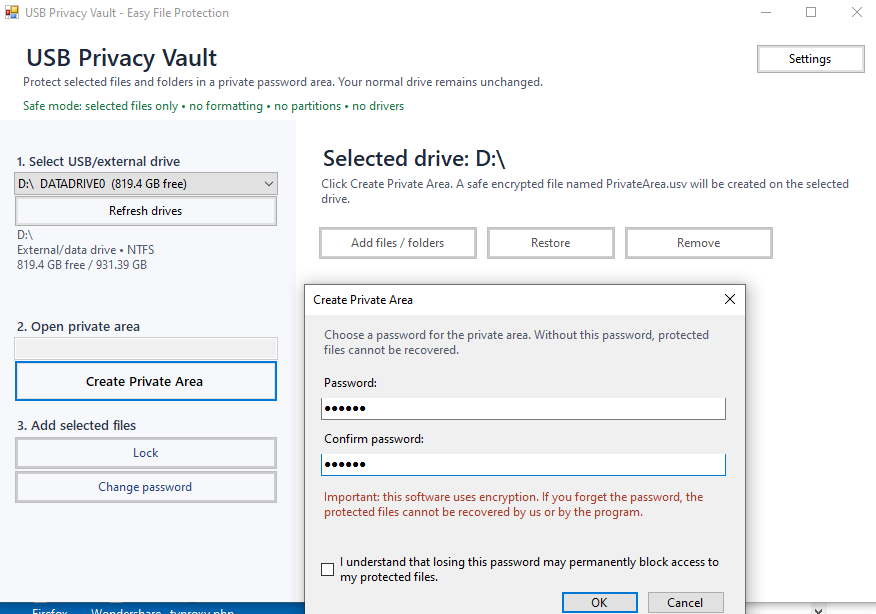
About Free USB Privacy Vault
USB Privacy Vault is an easy-to-use Windows software designed to help users protect selected files and folders on USB drives, external drives, and portable storage devices.
Instead of locking the entire USB drive or modifying partitions, USB Privacy Vault creates a private encrypted area where users can safely store sensitive documents, photos, work files, backups, and personal data. Normal files on the drive remain visible and accessible, while only the files added to the private area are protected by password.
The software is designed to be simple, portable, and safe. It does not format the USB drive, does not install drivers, and does not make dangerous changes to the device. Users can copy the program directly to a USB drive and run it when needed.
USB Privacy Vault is ideal for anyone who wants a simple way to keep private files protected while still using the USB drive normally.
Instead of locking the entire USB drive or modifying partitions, USB Privacy Vault creates a private encrypted area where users can safely store sensitive documents, photos, work files, backups, and personal data. Normal files on the drive remain visible and accessible, while only the files added to the private area are protected by password.
The software is designed to be simple, portable, and safe. It does not format the USB drive, does not install drivers, and does not make dangerous changes to the device. Users can copy the program directly to a USB drive and run it when needed.
USB Privacy Vault is ideal for anyone who wants a simple way to keep private files protected while still using the USB drive normally.
Key Features
- Protect selected files and folders with a password
- Create a private encrypted area on USB drives
- Keep normal USB files visible and unchanged
- Portable version available
- No drive formatting required
- No partition changes
- No drivers or background services
- Add files and folders easily
- Restore protected files when needed
- Lock the private area after use
- Optional removal of original unprotected files
- Automatic language detection
Who Is It For?
USB Privacy Vault is made for users who store personal, business, or sensitive files on USB drives and want a simple way to protect only selected files without locking the entire drive.
It is useful for students, office workers, freelancers, technicians, business users, and anyone who carries documents, photos, backups, or private data on portable storage devices.
It is useful for students, office workers, freelancers, technicians, business users, and anyone who carries documents, photos, backups, or private data on portable storage devices.
How It Works
Copy USB Privacy Vault to your USB drive or external drive.
Run the program.
Create a private area and choose a password.
Add the files or folders you want to protect.
Lock the private area when finished.
Open it again anytime with your password.
Run the program.
Create a private area and choose a password.
Add the files or folders you want to protect.
Lock the private area when finished.
Open it again anytime with your password.
FAQ
Does USB Privacy Vault lock the entire USB drive?
No. It protects only the files and folders you add to the private area. Your normal USB files remain visible and usable.
Can I protect files from C: or D:?
Yes. You can add files from USB drives, external drives, Desktop, Documents, C:, D:, or other folders. The software copies them into the protected private area.
Are my original files deleted automatically?
No. Original files are not deleted automatically. After protection, you can choose whether to keep them or move the original unprotected copies to the Recycle Bin.
What happens if I forget the password?
If you forget the password, you may permanently lose access to the protected files. For security reasons, there is no backdoor password.
Does it require installation?
No, the portable version can run directly from a USB drive. An installer version may also be provided for users who prefer a standard installation.
Does it format my USB drive?
No. USB Privacy Vault does not format the drive, does not create partitions, and does not modify the structure of the USB device.
Can I use it on external hard drives?
Yes. It can be used on USB flash drives, external HDDs, external SSDs, and other removable or data drives.
Get Free USB Privacy Vault
Protect your private files on USB drives with a simple, safe, and portable password-protected vault.
Part of the SoftwareApp product collection. This page provides official product information and direct access to the product download or external page.