Windows Software
Video&Media Encryptor
Encrypt videos, audio files, images and documents with AES-256 and protect your private media with a password.
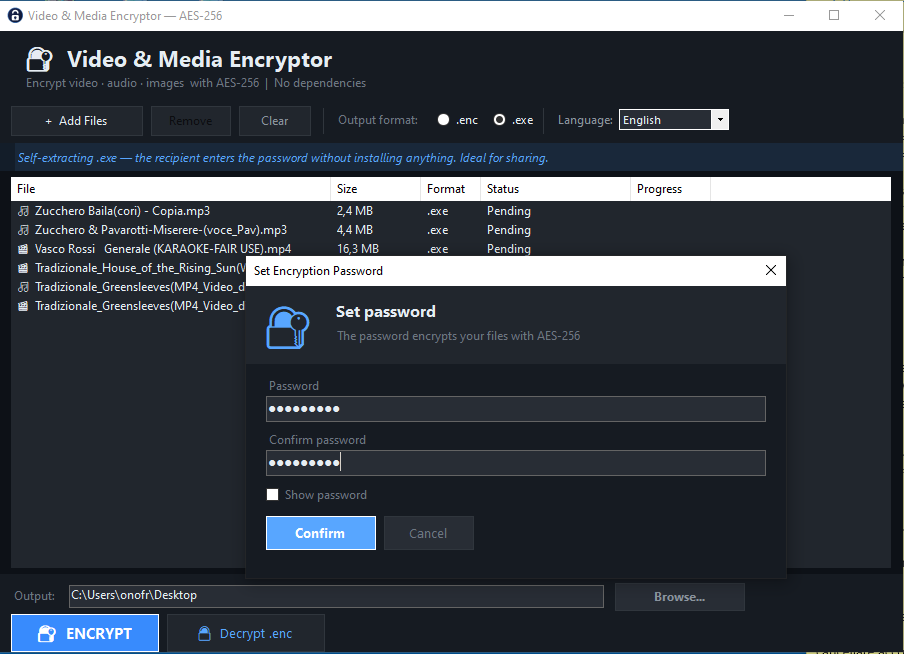
About Video&Media Encryptor
Video & Media Encryptor is a simple and secure desktop application designed to protect private videos, audio files, images, documents and other media files using AES-256 encryption.
With this software, you can encrypt your files into protected .enc files that can only be opened with the correct password. It is useful for anyone who needs to store sensitive media safely, share private files securely, or prevent unauthorized access to personal or professional content.
The program is lightweight, easy to use and does not require complex configuration. Just select your files, choose an output folder, enter a password and start the encryption process.
Encrypted files can be opened and decrypted only with Video & Media Encryptor and the correct password.
With this software, you can encrypt your files into protected .enc files that can only be opened with the correct password. It is useful for anyone who needs to store sensitive media safely, share private files securely, or prevent unauthorized access to personal or professional content.
The program is lightweight, easy to use and does not require complex configuration. Just select your files, choose an output folder, enter a password and start the encryption process.
Encrypted files can be opened and decrypted only with Video & Media Encryptor and the correct password.
Key Features
- AES-256 file encryption
- Encrypt videos, audio files, images and documents
- Create protected .enc files
- Password-based file protection
- Simple desktop interface
- Batch file encryption
- Choose custom output folder
- Decrypt and open protected files
- Portable ZIP distribution
- No complex setup required
Who Is It For?
Video & Media Encryptor is designed for users who want to protect private or sensitive files with a password. It is useful for content creators, professionals, photographers, video editors, small businesses, freelancers and anyone who needs to store or share private media files securely.
It can also be used by users who want to keep personal videos, images, audio recordings or documents protected from unauthorized access.
It can also be used by users who want to keep personal videos, images, audio recordings or documents protected from unauthorized access.
How It Works
Open Video & Media Encryptor.
Click Add Files and select the files you want to protect.
Choose the output folder.
Enter a secure password.
Click Encrypt.
The software creates protected .enc files.
To open an encrypted file, use Video & Media Encryptor and enter the correct password.
Click Add Files and select the files you want to protect.
Choose the output folder.
Enter a secure password.
Click Encrypt.
The software creates protected .enc files.
To open an encrypted file, use Video & Media Encryptor and enter the correct password.
Supported Formats / Platforms
- Video files
- Audio files
- Image files
- Documents
FAQ
Can I encrypt video files?
Yes, you can encrypt video files and protect them with a password.
Can I encrypt audio files and images?
Yes, the software supports audio files, images and other file types.
What is a .enc file?
A .enc file is an encrypted file created by Video & Media Encryptor. It cannot be opened normally without decrypting it first.
Do I need the password to open encrypted files?
Yes, the correct password is required to decrypt and open protected files.
Can encrypted files be recovered if I forget the password?
No. If you lose the password, the encrypted files cannot be recovered.
Does it work offline?
Yes, the software works locally on your Windows computer.
Do recipients need the program to open .enc files?
Yes, .enc files must be opened with Video & Media Encryptor and the correct password.
Can I use it without installation?
Yes, the software can be distributed as a ZIP package and used as a portable application.
Get Video&Media Encryptor
Protect your private videos, audio files, images and documents with AES-256 encryption. Download Video & Media Encryptor and secure your files today.
Part of the SoftwareApp product collection. This page provides official product information and direct access to the product download or external page.