Browser Extension
Web Page Change Monitor & Visual Text Diff
Monitor selected parts of web pages, get change alerts, and compare updates with a visual text diff.
Download Extension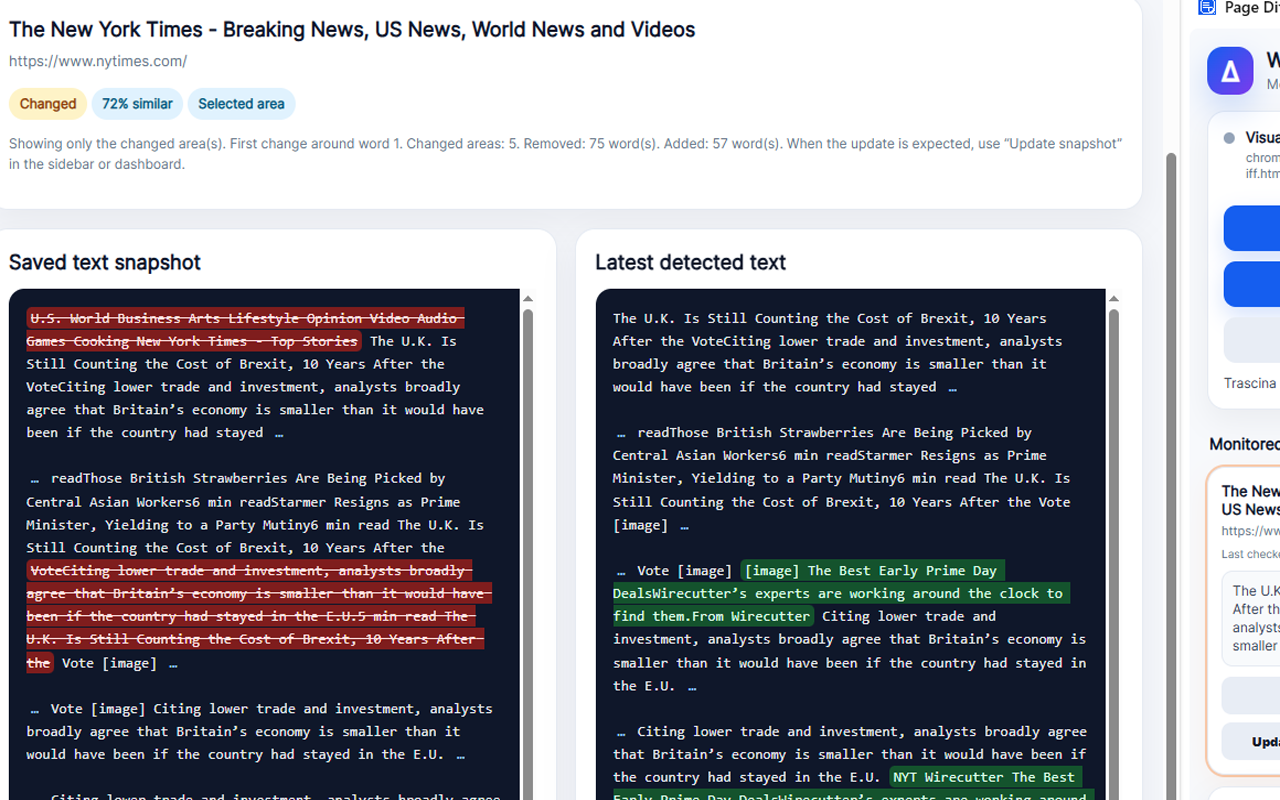
About Web Page Change Monitor & Visual Text Diff
Web Page Change Monitor & Visual Diff is a browser extension designed to help users track changes on important web pages without manually checking them again and again.
You can monitor a selected area of a page or the full page. The extension saves a local text snapshot and compares it with the latest visible content when you revisit the page. If something has changed, it highlights the monitored page and lets you compare the previous and current text with a clear visual diff.
It is useful for tracking public tenders, job listings, real estate pages, product availability, price changes, official notices, booking pages, news sections, and any other page where updates matter.
The extension is simple to use, works directly inside the browser, and stores monitored snapshots locally on your device.
You can monitor a selected area of a page or the full page. The extension saves a local text snapshot and compares it with the latest visible content when you revisit the page. If something has changed, it highlights the monitored page and lets you compare the previous and current text with a clear visual diff.
It is useful for tracking public tenders, job listings, real estate pages, product availability, price changes, official notices, booking pages, news sections, and any other page where updates matter.
The extension is simple to use, works directly inside the browser, and stores monitored snapshots locally on your device.
Key Features
- Monitor selected areas of web pages
- Monitor entire web pages
- Get alerts when monitored content changes
- Compare previous and current content with visual text diff
- Automatic check when you revisit a monitored page
- Live monitoring while the page is open
- Sidebar interface for quick access
- Dashboard with all monitored pages
- Import and export monitored pages
- Local browser storage
- Multilingual interface
- No account required
Who Is It For?
Web Page Change Monitor & Visual Diff is ideal for users who need to keep an eye on web pages that may change over time.
It is useful for professionals, researchers, job seekers, public tender consultants, real estate buyers, online shoppers, journalists, students, business owners, and anyone who wants to know when important web content has been updated.
Common use cases include monitoring public tenders, competitions, job offers, real estate listings, product availability, price changes, booking availability, official notices, documentation pages, and news updates.
It is useful for professionals, researchers, job seekers, public tender consultants, real estate buyers, online shoppers, journalists, students, business owners, and anyone who wants to know when important web content has been updated.
Common use cases include monitoring public tenders, competitions, job offers, real estate listings, product availability, price changes, booking availability, official notices, documentation pages, and news updates.
How It Works
Open the web page you want to monitor
Open the extension sidebar
Choose “Select area to monitor” or “Monitor full page”
The extension saves a local text snapshot
Return to the page later
The extension checks if the monitored content has changed
Open the visual diff to see what was updated
Use “Update snapshot” when you want to accept the latest version as the new reference
Open the extension sidebar
Choose “Select area to monitor” or “Monitor full page”
The extension saves a local text snapshot
Return to the page later
The extension checks if the monitored content has changed
Open the visual diff to see what was updated
Use “Update snapshot” when you want to accept the latest version as the new reference
FAQ
Can I monitor only part of a page?
Yes. You can select a specific area of a web page and monitor only that visible text.
Can I monitor the full page?
Yes. You can monitor the entire page if you want to track wider changes.
Does the extension take screenshots?
No. The extension focuses on clean visible text snapshots to reduce errors caused by images, layout changes, ads, or dynamic page elements.
Where are my monitored pages stored?
Monitored pages and snapshots are stored locally in your browser storage.
Does the extension send my data to external servers?
No. Monitored content is stored locally and is not sent to an external server.
Does monitoring work when the page is closed?
Real-time monitoring works while the page is open in a browser tab. If the page is closed, the extension checks it automatically when you open it again.
Can I see exactly what changed?
Yes. The visual diff compares the saved text snapshot with the latest detected text and highlights the changed content.
Can I export my monitors?
Yes. You can export and import your monitored pages using the built-in backup feature.
Does it work with dynamic pages?
The extension includes settings designed to improve compatibility with dynamic pages, including sites that load content after the initial page load.
Is an account required?
No. You can use the extension without creating an account.
Get Web Page Change Monitor & Visual Text Diff
Start monitoring important web pages and see exactly what changes.
Part of the SoftwareApp product collection. This page provides official product information and direct access to the product download or external page.