Browser Extension
Youtube Karaoke
Manage karaoke on YouTube like a professional: search for and add songs with their corresponding artists, options to adjust key/pitch for each individual track, and dual-screen support.
Download App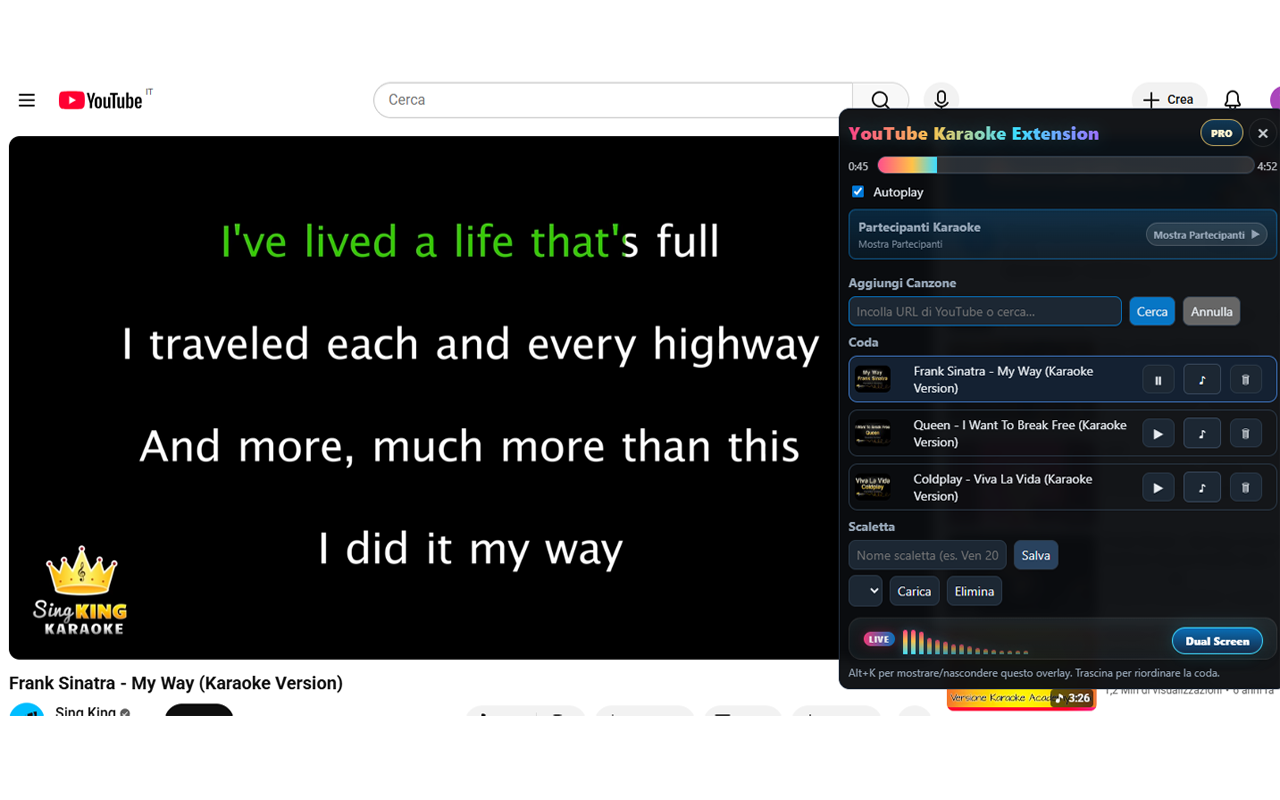
About Youtube Karaoke
Manage singers in seconds, queue songs via direct links or built-in search, and let a round-robin rotation keep turns fair and seamless. A clean scrub bar with current and total time lets you jump straight to the chorus, while thumbnails and quick controls make the queue easy to handle at a glance. During announcements, the extension mutes audio and switches playback to maximum speed, then automatically restores volume and speed when the video resumes—eliminating downtime.
Need a second screen? Dual Screen mode projects the karaoke video to an external display while you manage singers and the queue on your main screen. And when a song needs a different key, use per-track pitch/key adjustment—raise or lower the tone of individual songs without affecting the whole session.
Need a second screen? Dual Screen mode projects the karaoke video to an external display while you manage singers and the queue on your main screen. And when a song needs a different key, use per-track pitch/key adjustment—raise or lower the tone of individual songs without affecting the whole session.
Key Features
- 🎤 Add/remove singers in seconds; round-robin rotation for fair, smooth turns
- 🔎 Add songs by pasting a link or using integrated search (no API required)
- 🗂️ Drag-and-drop queue with thumbnails and quick controls
- 💾 Save / Load / Delete lineups for recurring events
- 🚫 Mute ads + max playback speed, then auto-restore volume and speed
- Precise scrub bar with current/total time display
- 🖥️ Dual Screen mode to project karaoke video to an external display
- 🎚️ Per-track pitch/key adjustment within the playlist
Who Is It For?
This extension is designed for anyone who runs or participates in karaoke sessions using YouTube. It’s especially useful for hosts who need to manage queues, singers, and playback smoothly without interrupting the flow.
It fits well for karaoke night organizers, bar or club hosts, event DJs, and even casual users who want a more structured and fair way to manage YouTube karaoke sessions with friends or small groups.
If you often find yourself manually skipping songs, losing track of whose turn it is, or struggling with playback control during live sessions, this tool is built to remove that friction.
It fits well for karaoke night organizers, bar or club hosts, event DJs, and even casual users who want a more structured and fair way to manage YouTube karaoke sessions with friends or small groups.
If you often find yourself manually skipping songs, losing track of whose turn it is, or struggling with playback control during live sessions, this tool is built to remove that friction.
How It Works
Install the extension and open YouTube on your browser. When you start a karaoke session, you can add songs instantly using YouTube links or the built-in search.
Each added song goes into a queue where singers are managed automatically. The extension handles turn rotation using a fair round-robin system, so everyone gets their turn without manual tracking.
During the session, you can control playback with a simple interface: skip parts of a song using the scrub bar, adjust volume and speed during announcements, or manage the queue with quick actions.
Each added song goes into a queue where singers are managed automatically. The extension handles turn rotation using a fair round-robin system, so everyone gets their turn without manual tracking.
During the session, you can control playback with a simple interface: skip parts of a song using the scrub bar, adjust volume and speed during announcements, or manage the queue with quick actions.
Supported Formats / Platforms
- Windows & Mac - Chrome & Edge & Firefox Browser
Demo Video
FAQ
Can I add songs directly from YouTube?
Yes. You can add songs using direct YouTube links or search within the extension.
Does it automatically manage singer turns?
Yes. It uses a round-robin rotation system to ensure fair and seamless turn management.
Can I use it with a second screen?
Yes. Dual Screen mode allows you to project the karaoke video while controlling the session from your main screen.
Can I adjust the pitch of individual songs?
Yes. Each track can have its own pitch/key adjustment without affecting the rest of the session.
What happens during announcements?
The extension automatically mutes audio and speeds up playback, then restores normal settings when you resume.
Get Youtube Karaoke
Install now in your browser!
Part of the SoftwareApp product collection. This page provides official product information and direct access to the product download or external page.